

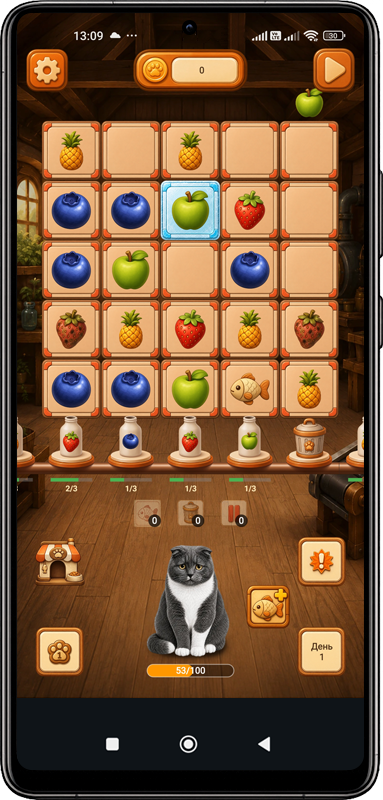
Keep the drinks moving
Timerine Factory combines factory management with a fruit-sorting puzzle. Ingredients arrive on the board, and you tap or drag fruit to send matching ingredients into the appropriate bottles. The board fills as you play and the conveyor speed changes, so keeping space available matters alongside making the right drinks.
Spoiled fruit and incorrect ingredients need attention. Fish has a different destination: the cat’s bowl. The warehouse is another part of the picture, because overflowing it can cost coins. A useful starting habit is to look at the board, production needs and cat together before concentrating on just one of them.
From juice to more recipes
The factory begins with fruit juice. As you develop it, more fruits, ingredients and recipes become available. Fizzy ingredients add fruit soda to production, and milk is used for yogurt. Expansion involves meeting requirements and investing the coins you earn.
This gives each production decision a wider context. Clearing a busy board helps with the current run; understanding the next available recipe or improvement helps you decide what to work toward. Check the requirements displayed by the game before spending, so the improvement you choose fits your current factory.
Orders give you something to work toward
Production orders and accuracy tasks ask you to do more than simply keep the conveyor moving. The game includes tasks involving fruit collection and cat care, completed-order streaks and special events. Coins and useful rewards can come from these activities.
Special items provide another way to handle a crowded board. They can clear spoiled fruit or temporarily stop new fruit from arriving. Items can be bought or earned as rewards. The how to play guide explains how to connect these tools with the problem you are trying to solve, without relying on a fixed upgrade order.
The cat is part of the factory
Pay attention to the cat’s mood, feed fish or special food, play together and furnish a room. Care is a regular part of running the factory.
Furniture and other items help the cat stay in a good mood for longer as game days become more demanding. You can also unlock other cats and choose a favourite. The story can end if the cat leaves or the factory becomes overwhelmed by debt, so production and care both deserve attention.
Read the lucky cat guide for a practical way to fit care into your factory routine.
Posters you can keep on your phone
The cat collection includes themed posters about the cats’ adventures. High-resolution posters can be downloaded to your phone and used as wallpapers. Downloaded posters remain in the device gallery until you remove them there, even if you later delete a game account.
Accounts, ads and purchases
You can play without signing in to Google. The game creates an anonymous game account automatically; linking Google is optional and supports cloud saving. Local progress, unlocked content and settings are stored on your device; account and cloud options are worth reviewing before moving to a new phone or clearing app storage.
Timerine Factory includes advertising and optional purchases. Premium is a one-time purchase that disables ads. Premium and coin packs are handled through Google Play Billing. Purchase status and limited purchase records are used to deliver and restore purchases where applicable. For a missing purchase or save, see the Factory FAQ and support guidance.
Visit Timerine Factory on Google Play for the current Android listing. Account choices and data handling are explained in the privacy policy and account deletion instructions.